
Saving things to your binder
What the binder is, how to save items from your conversations, and how to organise your documents.
The binder is your personal collection of useful things from SpektraBot. Template letters, checklists, explanations of your rights, meeting preparation notes: anything you want to keep and come back to later.
Think of it like a folder on your desk, but one that is always with you and always organised.
How the binder is organised
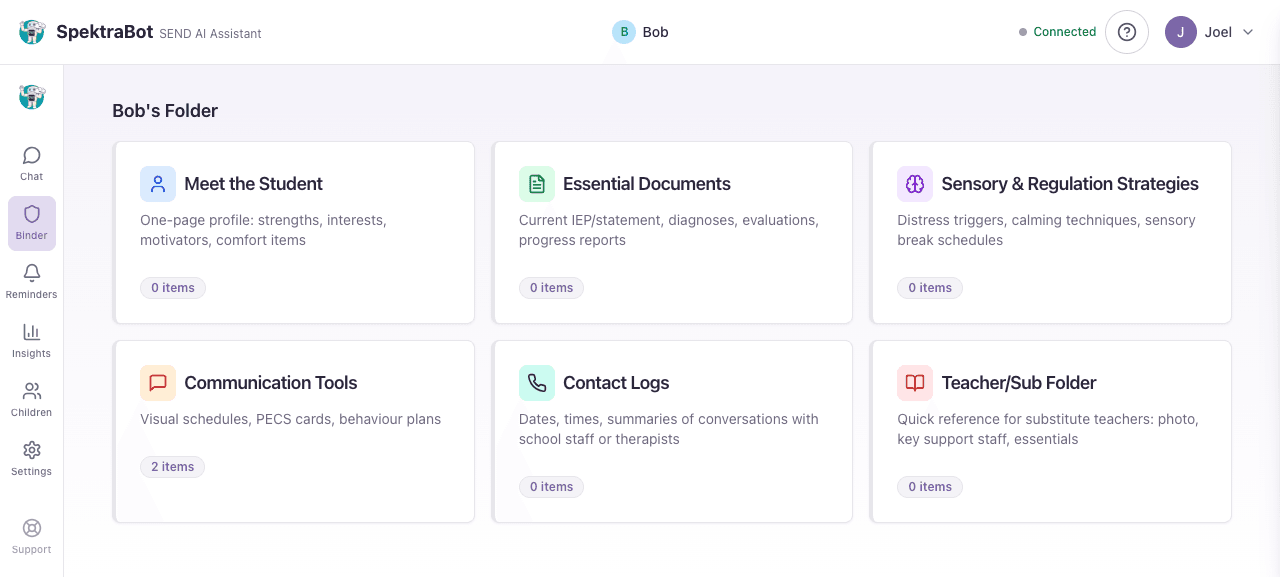
Your binder is organised into sections, each designed for a different type of information:
- Meet the Student: Key details about your child, their profile, and what helps them
- Essential Documents: Template letters, checklists, important correspondence
- Sensory & Regulation: Strategies, sensory profiles, regulation plans
- Communication Tools: Communication aids, visual supports, social scripts
- Contact Logs: Records of calls, emails, and meetings with school or LA
- For Teachers and Supply Staff: Information for supply teachers or new staff
Each section shows how many items it contains. Select a section to see the items inside it.
How items are saved
SpektraBot suggests binder items automatically during conversations. When it produces something worth keeping, like a template letter or a summary of your rights, you will see a save suggestion below the response with the section it belongs to. Select it to save the item to your binder. You can also add items manually from within any binder section.
Each saved item has a status (Active, Draft, Action Required, or Archived) so you can track what still needs attention.
Finding things in your binder
Open your binder by selecting Binder from the navigation menu. You will see your sections displayed as cards. Select a section to see the items inside it, including:
- The title of each item
- Its status
- When it was last updated
Using binder items
You can do several things with a saved item:
- View it: Read the full content at any time
- Edit it: Update the title, body, tags, or status
- Copy it: Copy the text to your clipboard to paste into an email or document
How long items are kept
Items stay in your binder for as long as you have an account. If you delete your account, all binder items are permanently removed in line with our data retention policy.
Try asking this question in a chat:
“Can you write me a template letter I can save to my binder?”